
IRS Notices
CP14 Pay Online: How to Pay Your IRS CP14 Notice Online in 2026
The short answer: the fastest free way to pay a CP14 online is IRS Direct Pay at IRS.gov — no login needed. Choose "Balance Due" as the reason and select the exact tax year printed on your notice. If you can't pay in full, you can apply for a payment plan online in the same session.
If you searched "CP14 pay online," you're probably holding the notice right now: a bill from the IRS with a pay-by date, a tear-off stub, and a return envelope that assumes you'll mail a check like it's 1995. You'd rather pay from your kitchen table and walk away with a confirmation number — and that instinct is exactly right. This page walks you through every online route, in order of how well each one works.
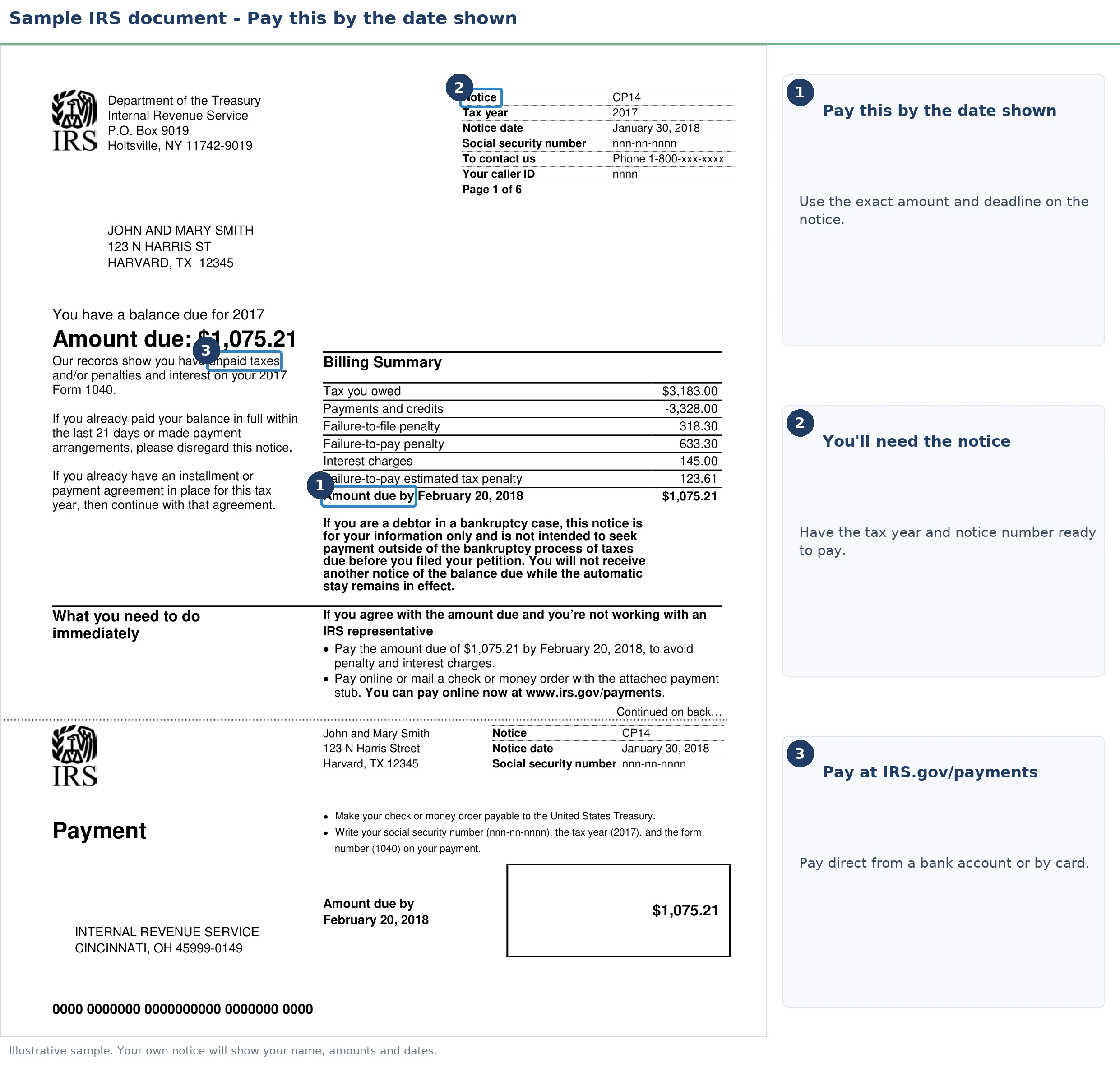
Two numbers on your CP14 control everything you're about to do online — the tax year and the amount due. The image below shows you exactly what the notice looks like and where those figures sit, so keep it handy before you type anything into IRS.gov.
⏱ Your deadline: the "pay by" date printed on your CP14 — typically 21 days from the notice date (10 business days if the balance is $100,000 or more). Pay online by that date and the notice amount is exact and the collection sequence stops. Pay after it, and daily-compounding interest means the printed figure is already too low.
Why the IRS billed you — and why paying online beats mailing the stub
A CP14 is the IRS's first bill for a balance due, and an online payment is credited the day you submit it — a mailed check can take weeks to open, post, and match to your account. That gap matters, because the notice sequence behind a CP14 is fully automated: if your check sits unopened while the system's clock runs out, the next notice mails anyway.
In 2026 that risk is bigger, not smaller. The IRS cut roughly 27% of its workforce in 2025, so paper correspondence and mailed payments move through fewer hands — but the automated notice stream never slowed down. Paying electronically, with a timestamped confirmation number, takes the mail out of the equation entirely.
This guide assumes your CP14 is accurate and focuses on the payment itself. If you need the full decode of the notice — why it was issued, what each line means — that's covered in our CP14 notice guide, and IRS letters in general are explained in why did I get a letter from the IRS. If the balance looks wrong, jump to our CP14 wrong amount guide before paying anything; if you already paid, see CP14 notice but I already paid — a real share of these notices simply crossed in the mail with a payment.
What happens if you don't pay your CP14
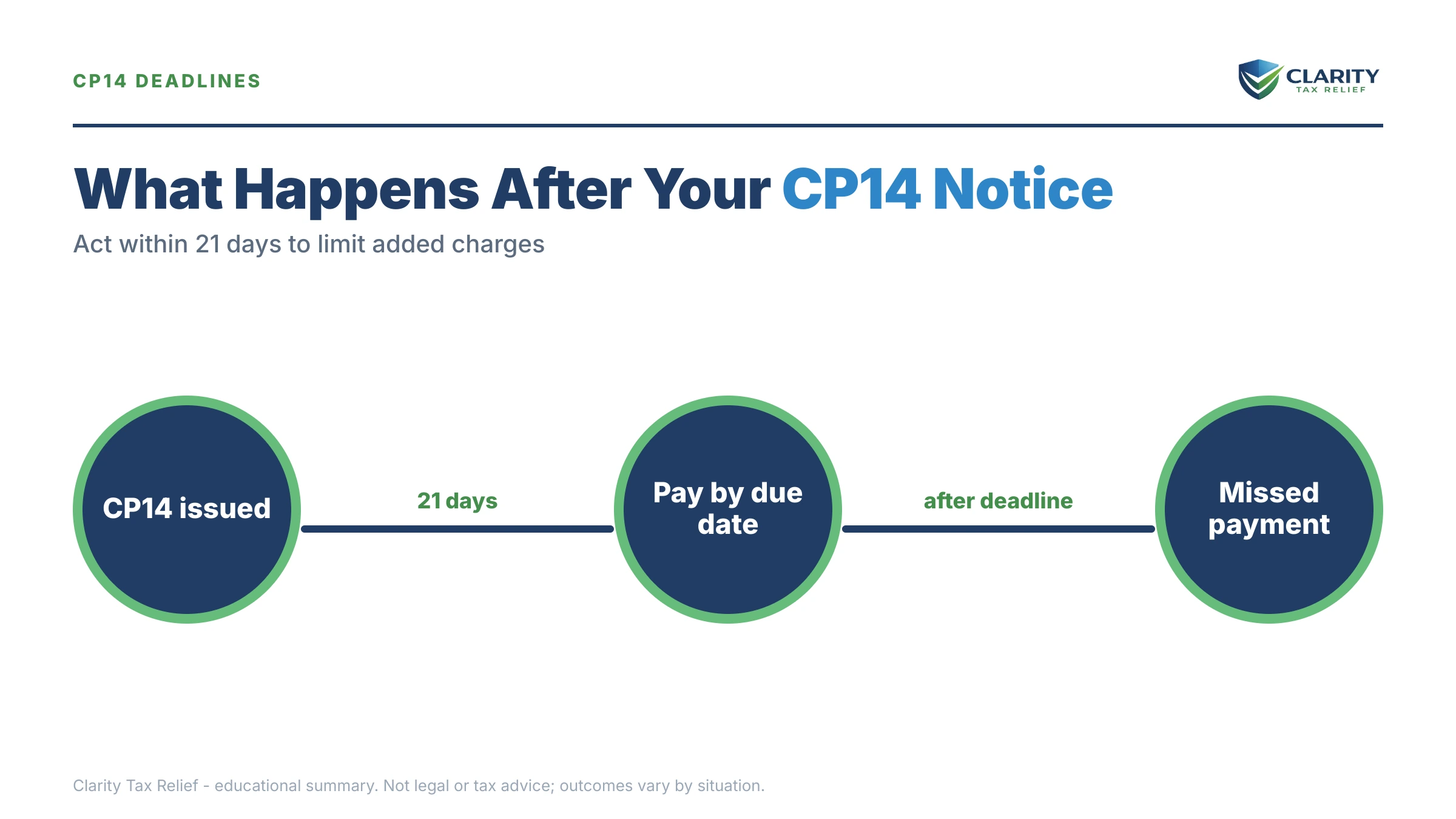
An unpaid CP14 starts an automated escalation that ends in levy power — no human decides to send the next letter. The sequence runs in a fixed order, and each stage adds more interest and more enforcement authority:
- CP14 — the first bill. You are here. No enforcement power yet; this is the cheapest moment in the entire sequence to resolve the balance.
- CP501 and CP503 — reminder notices, typically arriving several weeks apart. Still just bills, but the failure-to-pay penalty and interest have been compounding the whole time.
- CP504 notice — Notice of Intent to Levy under IRC §6331(d). The IRS can now seize your state tax refund, and a federal tax lien becomes a live possibility.
- LT11 / Letter 1058 — the Final Notice of Intent to Levy. It starts a 30-day clock and your Collection Due Process appeal rights; after that window, wage and bank levies are on the table.
- Levy stage — for retirees, this is where it gets personal: the Federal Payment Levy Program can take up to 15% of every Social Security check, continuously, until the debt is resolved. Our guide on whether the IRS can garnish Social Security covers exactly how that works.
| Stage | What it can do | Your window |
|---|---|---|
| CP14 | Bills you; no enforcement yet | Typically 21 days from the notice date (10 business days if the balance is $100,000 or more) |
| CP501 / CP503 | Reminders while penalties and interest compound | Typically several weeks between notices |
| CP504 | State tax refund can be seized; lien risk rises | 30 days stated on the notice |
| LT11 / Letter 1058 | Final notice; wage and bank levies become possible | 30 days to pay, arrange, or appeal (Form 12153) |
| Levy stage | Bank levies, wage levies, up to 15% of Social Security | Continues until the balance is resolved |
Holding a CP14 and not sure how — or whether — to pay it?
Get it reviewed free before the pay-by date on your notice passes. An experienced tax professional will confirm the balance is right, tell you which online option fits your finances, and flag any penalty relief you're leaving on the table — no pressure, no obligation.
CP14 pay online: every payment method compared
The IRS accepts CP14 payments through four online channels, and only two of them are free. The right one depends on whether you're paying in full, whether you have a checking account, and how fast you need proof of payment.
| Method | Cost | What you need | Best for |
|---|---|---|---|
| IRS Direct Pay | Free | Bank routing/account numbers + a prior tax return to verify identity | Most people paying in full — no login required |
| IRS Online Account | Free (bank payment) | ID.me login | Verifying the balance first, then paying the live payoff figure |
| Debit/credit card or digital wallet | Processor fee (flat fee for debit; roughly 2% for credit) | A card; processors are linked from IRS.gov | People without a checking account — otherwise the fee is wasted money |
| EFTPS | Free | Enrollment; PIN arrives by mail, typically about a week | Recurring payments — too slow to start for a CP14 deadline |
| Online Payment Agreement | $0 for short-term plans; setup fee may apply for monthly plans (low-income waivers exist) | Balance within the online thresholds; all returns filed | Anyone who can't pay the full balance by the notice date |
IRS Direct Pay — the default choice
Direct Pay is free, requires no account, and credits your payment the day you submit it. You'll pick "Balance Due" as the reason, choose the tax year from your notice, and verify your identity using details from a past return — filing status, name, address, SSN, and date of birth. One retiree-specific trap: if you've moved since filing, verification checks the address on the return for the year you select. If it rejects you, try verifying with an older year whose return still shows your previous address.
You can also schedule the payment for a future date — useful if your Social Security deposit lands before the pay-by date and you want the money to arrive first. Print or screenshot the confirmation number before you close the window; it's your receipt if a follow-up notice crosses in the mail.
IRS Online Account — verify first, then pay
Your Online Account shows the live balance including interest through today, while the CP14 figure is only exact through the printed due date. If you're paying late — even a week late — pay the account figure, not the notice figure, or a small residual balance survives and generates another notice. Setting up the login takes an ID.me identity check; our IRS online account setup walkthrough covers the process and its common snags.
Card payments and digital wallets — legal, but you pay extra
The IRS itself never touches your card; approved third-party processors handle these payments and charge for it — a flat few dollars on debit, a percentage (roughly 2%) on credit. On a five-figure balance the credit-card fee alone can run several hundred dollars, and card interest usually exceeds the IRS's own rate. Use a card only if you have no bank account. For a fuller comparison of every channel, see the best way to pay the IRS.
EFTPS — skip it for a one-time CP14 payment
The Electronic Federal Tax Payment System is free and excellent for recurring payments, but enrollment requires a PIN mailed to your address — typically about a week. If your CP14 deadline is close, that lag makes EFTPS the wrong tool for this job.
Can't pay $23,800 at once? Your online options by balance
A CP14 balance under $50,000 can usually be put on a payment plan entirely online, with no financial disclosure. The Online Payment Agreement application takes minutes, and approval on streamlined plans is largely automatic if your required returns are filed. The thresholds break down by amount:
| You owe | Online option | What to know |
|---|---|---|
| Under $10,000 | Guaranteed installment agreement or short-term plan | Approval is essentially assured if your filing history is clean and you can pay within 3 years |
| $10,000–$25,000 | Streamlined installment agreement, up to 72 months | No financial disclosure required; set up entirely online |
| $25,000–$50,000 | Streamlined plan with direct debit required | Payments must come automatically from your bank account |
| Over $50,000 | Online long-term plans unavailable | Expect Form 9465 plus financial disclosure — see our guide to an IRS payment plan over $50,000 |
Any balance can also use the short-term plan: up to 180 days, $0 setup fee. Interest and the failure-to-pay penalty keep accruing on every plan — a payment arrangement stops enforcement, not the meter. And if paying anything at all would leave you unable to cover rent, medication, and food, Currently Not Collectible status can pause collection entirely; our guide to IRS hardship on Social Security explains how fixed-income taxpayers qualify.
A worked example: $23,800 on a fixed income
Say you're retired, living mainly on Social Security, and your CP14 shows $23,800 — maybe from a retirement-account withdrawal that had no withholding. Here's the honest math on each online path:
- Pay in full via Direct Pay: free, done, and the notice sequence stops that day. If you have the savings, this is the cheapest outcome by far.
- 180-day short-term plan: $0 to set up. But the failure-to-pay penalty runs 0.5% per month — about $119/month on $23,800 — so six months costs roughly $714 in penalty alone, plus daily-compounding interest.
- 72-month installment agreement: $23,800 ÷ 72 ≈ $331/month before interest. Because $23,800 sits under the $25,000 streamlined line, you can set this up online with no financial disclosure. A bonus most people miss: on an approved agreement the failure-to-pay penalty drops from 0.5% to 0.25% per month — roughly $59.50/month instead of $119 at the start, declining as you pay down.
- If $331/month isn't survivable on your benefit checks, Currently Not Collectible or a lower partial-payment arrangement may fit better than forcing a plan you'll default on — that's a conversation worth having before you commit online.
Want to see how the penalty and interest math runs on your own numbers? You can estimate it with our IRS Penalty & Interest Calculator.
One more lever: if this is your first penalty after three clean years, first-time penalty abatement can remove the failure-to-pay penalty — our first-time penalty abatement guide covers the request. Starting in summer 2026, the new Automatic Exemption from Penalty applies similar relief automatically, with no request needed — so don't assume the penalty on your notice is permanent.
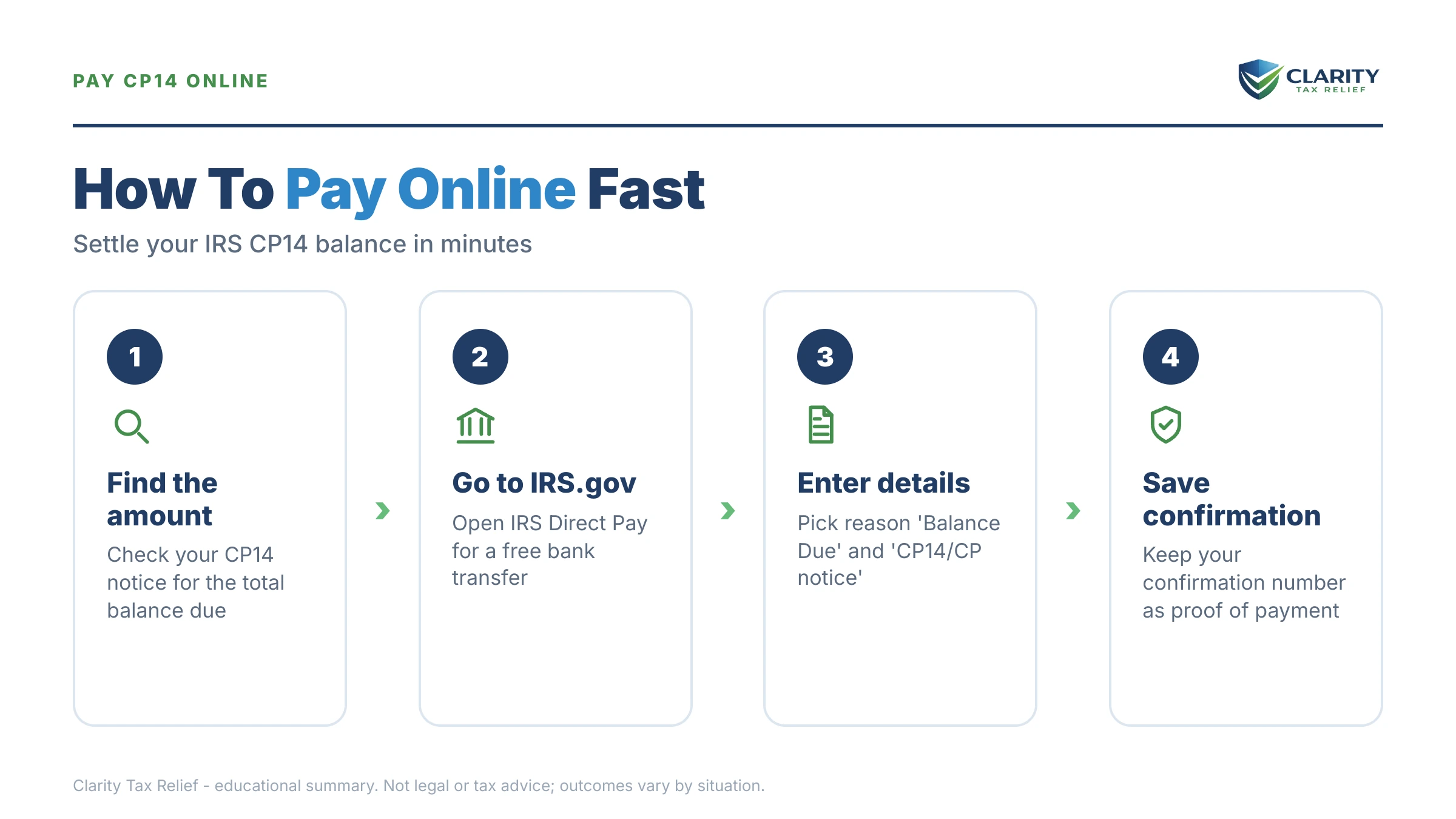
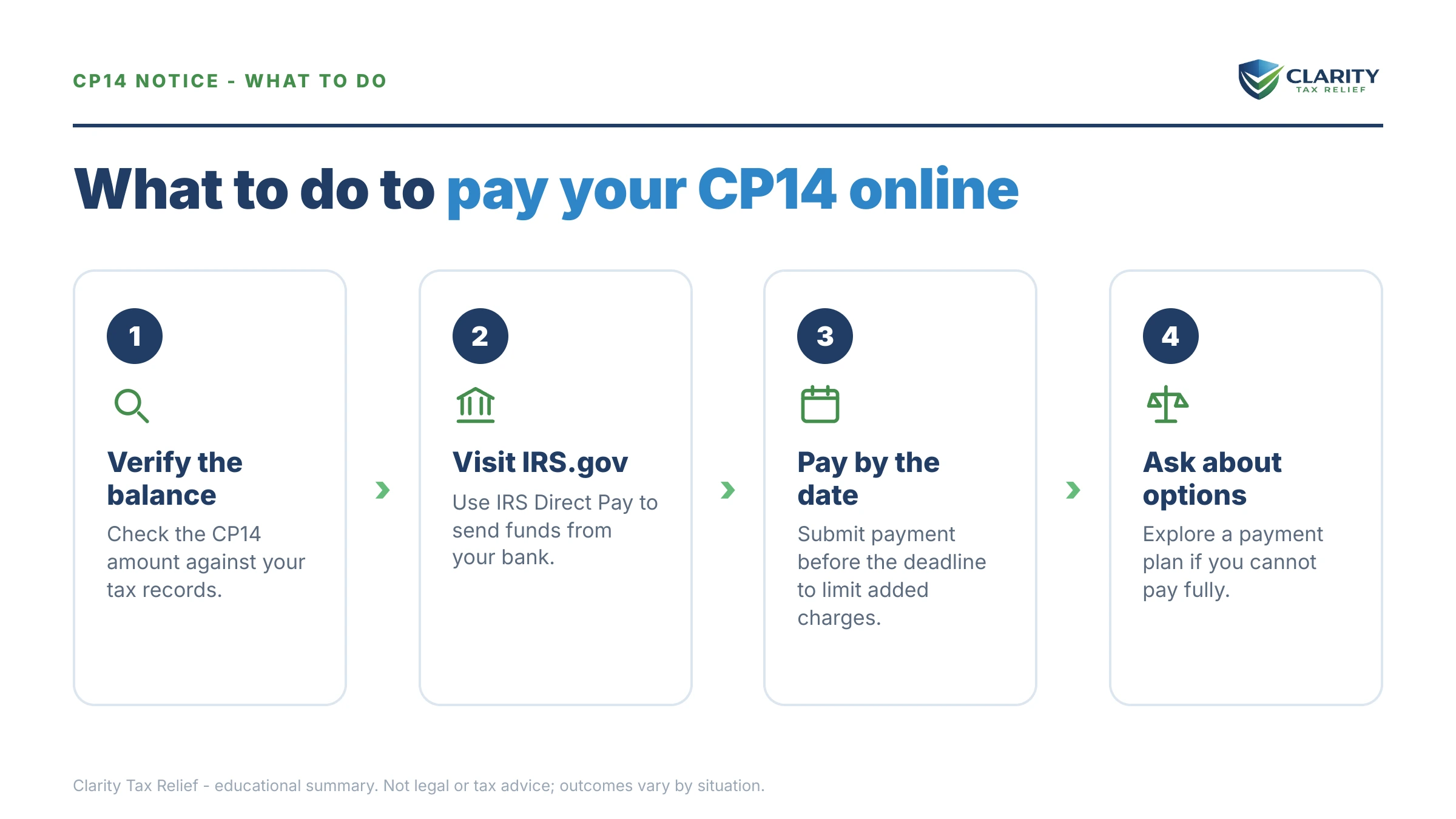
How to pay a CP14 online, step by step
- Verify the balance — log into your IRS Online Account and compare the balance there against the amount printed on your CP14 — confirm the tax year matches and any payments you've made have posted.
- Choose your payment method — use IRS Direct Pay at IRS.gov/payments (free, from a bank account) to pay in full, or start an Online Payment Agreement application if you need a short-term or monthly plan instead.
- Select the right reason and tax year — in Direct Pay, choose "Balance Due" as the reason for payment and select the exact tax year printed on your CP14 — a payment applied to the wrong year won't stop the notices.
- Verify your identity with a prior return — Direct Pay confirms who you are using details from a past tax return — filing status, name, address, SSN, and date of birth; if you've moved recently, use the year whose return shows your old address.
- Save your confirmation number — print or screenshot the confirmation page before closing the browser — it's your proof of payment if the CP14 crosses in the mail with a follow-up notice.
- Confirm the payment posted — recheck your IRS Online Account within about a week to see the payment reflected against the right year; if the balance doesn't move, call the number on your notice with the confirmation number in hand.
The IRS's own explainer for this notice lives at Understanding your CP14 notice — worth a bookmark alongside this page.
When you can handle this yourself — and when to get help first
Most CP14s don't need professional help, and it would be dishonest to tell you otherwise. Handle it yourself if:
- The balance matches your return and you can pay in full — Direct Pay takes ten minutes.
- You can pay within 180 days — the short-term plan is free to set up and self-explanatory.
- You owe under $25,000 and the streamlined monthly payment fits your budget comfortably.
Experienced help genuinely changes the outcome when:
- The plan payment would break your budget. Committing online to $331/month you can't sustain sets up a default — and a defaulted agreement puts you back in the collection stream with less goodwill. Hardship status or a partial-payment plan may fit better, but both take financial documentation done right.
- You have unfiled years. Payment plans require all returns filed, and the order you fix things — returns, penalties, then the balance — changes what you ultimately pay.
- The CP14 covers multiple years or a disputed amount. Paying the wrong year, or paying a balance you could have contested, is money you don't get back easily.
- Enforcement is already in motion — if this CP14 arrived alongside a CP504 or LT11 for another year, the clock you're on is shorter than this notice suggests.
Terms on your CP14, decoded
- Notice date: the issue date in the top-right corner — your response window and the interest math both run from here.
- Amount due: the total that's accurate only through the pay-by date; interest compounds daily after it.
- Failure-to-pay penalty: 0.5% of the unpaid tax per month (capped at 25%), reduced to 0.25% while an approved installment agreement is in effect.
- Direct Pay: the IRS's free bank-transfer tool — no registration, immediate confirmation number.
- Installment agreement: an official IRS monthly payment plan; enforcement stops while it stays in good standing.
- Levy: the actual seizure of money or property — wages, bank funds, Social Security — available to the IRS only at the far end of the notice sequence, not at CP14.
If your CP14 balance is large, disputed, or stacked on top of other tax years, a free review of the notice before you pay online can save you from locking in the wrong move — request one here or call (888) 825-7779.
CP14 online payment questions, answered
Can I pay a CP14 notice online?
Yes. Every CP14 can be paid online at IRS.gov using Direct Pay (free, from a bank account), your IRS Online Account, a debit or credit card through an approved processor, or EFTPS. Direct Pay is the fastest route for most people — no login is required, and you receive a confirmation number immediately. Just make sure you select the tax year printed on your notice.
Should I pay the amount on the CP14 or the balance in my IRS online account?
If you pay by the due date printed on the notice, pay the notice amount — it is calculated to be accurate through that date. If you are paying after the due date, log into your IRS Online Account and pay the current balance instead, because interest compounds daily and the notice figure is already stale. Underpaying by even a few dollars leaves the account open and generates another notice.
How long does an online IRS payment take to post?
Direct Pay and Online Account payments are credited as of the day you submit them (or the future date you schedule), which is what stops additional failure-to-pay penalty on that amount. The payment can take a few days to appear in your online account, so don't panic if the balance doesn't update overnight. Keep your confirmation number until you see the balance reflect the payment.
Can I pay a CP14 with a credit card?
Yes, through the third-party processors linked from IRS.gov/payments, but the processor charges a percentage fee — roughly 2% — on top of your balance, and card interest rates usually exceed the IRS's rate. Paying by bank account through Direct Pay is free. A card only makes sense if you have no bank account or a compelling short-term reason to pay the premium.
I already paid — why did I get a CP14?
CP14s regularly cross in the mail with recent payments, and payments sometimes post to the wrong tax year. Log into your IRS Online Account and check whether your payment shows on the year the notice covers. If it posted correctly, the notice may simply be outdated; if it posted to the wrong year or is missing, respond with proof rather than paying twice.
Can I set up a CP14 payment plan online instead of paying in full?
Yes. If you owe $50,000 or less in combined tax, penalties, and interest, you can apply online for a long-term installment agreement of up to 72 months; short-term plans of up to 180 days are available with no setup fee. Approval on these streamlined plans is largely automatic if your required returns are filed. Interest and a reduced failure-to-pay penalty continue while you pay.
Does paying my CP14 online stop penalties and interest?
Paying in full stops new penalties and interest from accruing as of your payment date — but it doesn't erase the ones already charged. If this is your first penalty in years, first-time penalty abatement can remove the failure-to-pay penalty even after you've paid, and starting in summer 2026 the IRS's Automatic Exemption from Penalty applies similar relief without a request.
How do I know I'm paying the real IRS online?
Type IRS.gov directly into your browser — never follow a link from an email, text, or search ad, because the IRS doesn't initiate contact that way. Real IRS payments go only to the United States Treasury through IRS.gov or its listed card processors. Anyone directing you to gift cards, wire transfers, or payment apps is a scammer, not the IRS.
What if the amount on my CP14 is wrong?
Don't pay a balance you don't owe on the assumption the IRS will fix it later. Compare the notice against your return and your IRS Online Account; if a payment is missing or the math doesn't match, respond in writing with documentation before the due date. Paying the undisputed portion while you dispute the rest limits penalty exposure on what you genuinely owe.
Can the IRS take my Social Security if I don't pay a CP14?
Not at the CP14 stage — but yes, eventually. If the balance goes unresolved through the final notice, the Federal Payment Levy Program can take up to 15% of each Social Security benefit payment, continuously, until the debt is resolved. Setting up even a modest installment agreement or documented hardship status prevents that levy from ever starting.
Your next 24 hours
- Find the two numbers that control everything: the notice date and pay-by date in the top-right corner of your CP14, and the exact amount due. Write them down.
- Gather what any online payment or plan needs: last year's tax return (for identity verification), your bank routing and account numbers, and the notice itself.
- Act before the pay-by date: if the balance is right and affordable, pay or set up your plan today at IRS.gov. If it's wrong, bigger than your budget can absorb, or stacked on other tax years, get a free case review first — the 2-minute form or (888) 825-7779 — while the 21-day window (10 business days if the balance is $100,000 or more) is still open.
This guide is general information, not tax or legal advice for your specific situation. Eligibility for IRS programs depends on individual facts and circumstances; no outcome is guaranteed.