
IRS How-To Guides
IRS Online Account Setup: Step-by-Step Walkthrough (2026)
The short answer: IRS online account setup happens at IRS.gov and typically takes about 15 minutes: create a free ID.me login, verify your identity with a government photo ID and a selfie (or a live video call), then sign in to see your balance, transcripts, digital notices, and payment-plan options — free, 24/7.
You got a letter saying you owe, or your paycheck withholding didn't add up, and now you need one number: what the IRS actually shows against your name. You tried calling and gave up on hold. The good news: you don't need the phone line at all — this IRS online account setup walkthrough gets you to that number today, from your couch.
The image below shows exactly what the setup screens and the account dashboard look like, so you'll know you're in the right place at every step — and where your balance appears once you're in.
⏱ The clock that's actually running: there's no deadline to create an IRS online account — but if you owe, the meter never stops. The failure-to-pay penalty adds 0.5% of your balance every month, and interest compounds daily until you pay or get into a plan. Every month you wait to look, the number gets worse.
Why an IRS online account matters more in 2026 than ever
The IRS cut roughly 27% of its workforce in 2025, and the online account is now the fastest — often the only practical — way to see what you owe. Phone wait times have gotten worse, not better; if you've read our guide on what to do when you can't reach the IRS on the phone, you already know the account is the workaround.
Here's the part that matters if you have a balance: the humans got harder to reach, but the automated collection notices never stopped. The system that escalates a tax debt runs on its own. Your account is how you see what that system sees — before its next letter goes out.
The account also solves the trust problem. Scam letters, texts, and calls impersonate the IRS constantly. The balance inside your logged-in account at IRS.gov is the one number no scammer can fake, so it's the first thing to check before you pay anyone anything.
What you'll need before you start
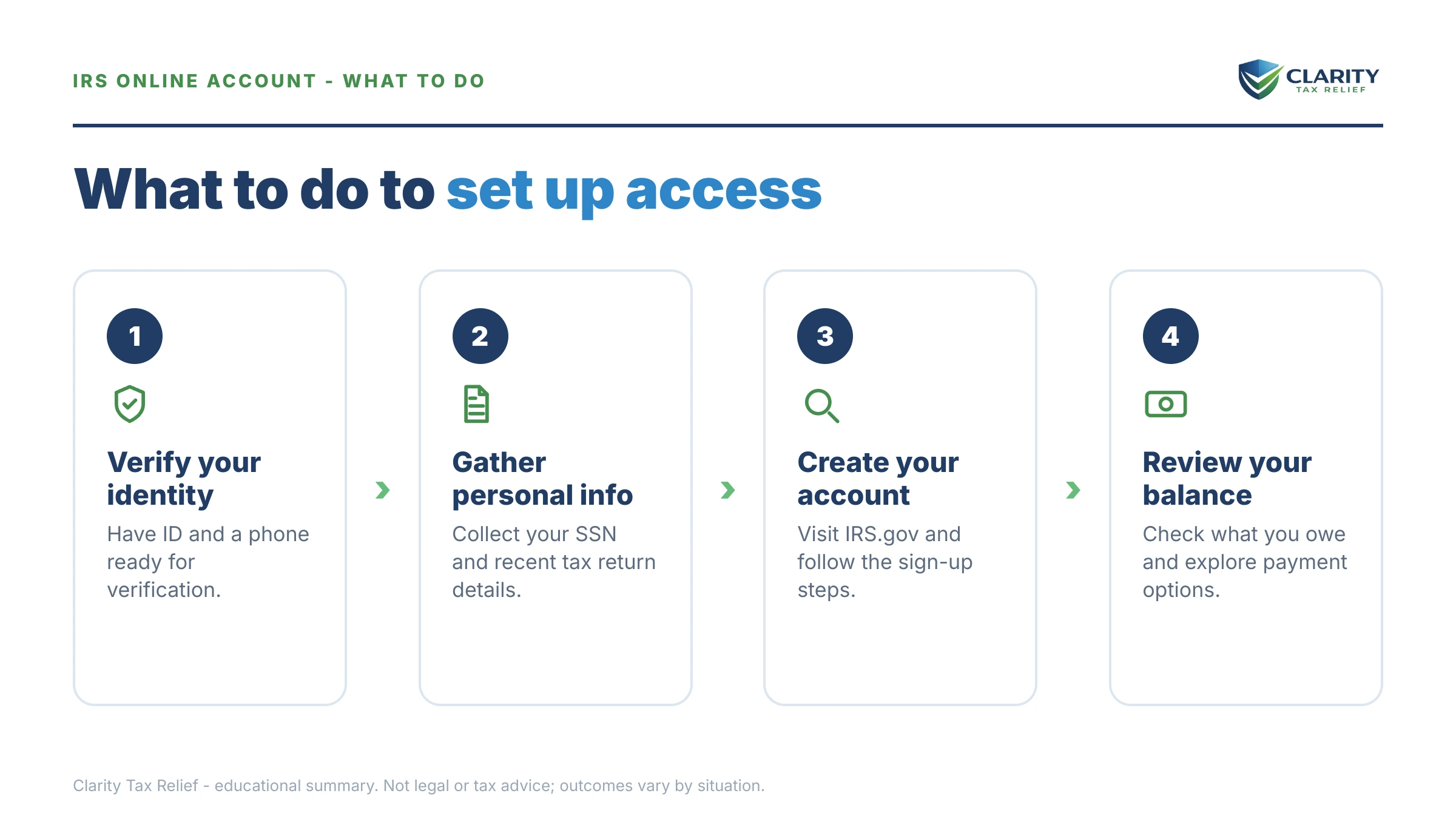
You need three things for IRS account setup: a government photo ID, your Social Security number, and a device with a camera. Gather these before you begin and the whole process usually runs in one sitting:
- Photo ID — a current driver's license, state ID, or U.S. passport. The name must match your current legal name (a common snag after marriage or divorce).
- Your Social Security number (or ITIN).
- A smartphone or a computer with a webcam — the selfie check compares your face to your ID photo.
- An email address you control — this becomes your login and where security codes land.
ID.me — the identity service the IRS uses for individual logins — gives you two ways to prove who you are:
| Verification path | What you need | Typical experience |
|---|---|---|
| Self-service (automated) | Photo ID, video selfie, SSN | Usually 10–15 minutes, fully automated |
| Live video chat | Photo ID plus supporting documents, reviewed by a live agent | Slower — you may wait for an agent — but works when the selfie check fails |
If neither path works, you're not locked out of the IRS entirely — see the troubleshooting section below.
What happens if you owe and never look
IRS collection escalates in a fixed, automated sequence whether or not you ever open the mail. Notices go to your last known address — so if you've moved, the first sign of trouble can be the enforcement itself. The sequence runs in stages:
- First bill (CP14) — the balance, penalties, and interest, with a pay-by date. Cheapest moment to fix anything.
- Reminder notices (CP501/CP503) — still just bills, but the balance grows every month they go unanswered.
- CP504 — intent to levy — the IRS can now take your state tax refund, and a federal tax lien becomes a live risk.
- LT11 / Letter 1058 — final notice — starts a 30-day clock on your appeal rights. After it runs, wage and bank levies are legal.
- Levy — a bank levy freezes funds with a 21-day hold before the money leaves; a wage levy continues every payday until released. If you're already past this point, start with our guide for when the IRS took money out of my bank account.
Your online account shows the balance behind all of this in real time and, for many notices, a digital copy — so a move, a mail mix-up, or a stolen letter never leaves you blind again.
Logged in and found a balance you can't pay?
Don't close the laptop and hope. Send us what your account shows — an experienced tax professional will map every option you qualify for, free and confidential, before another month of penalties and interest posts to the balance.
What you can do inside your IRS online account
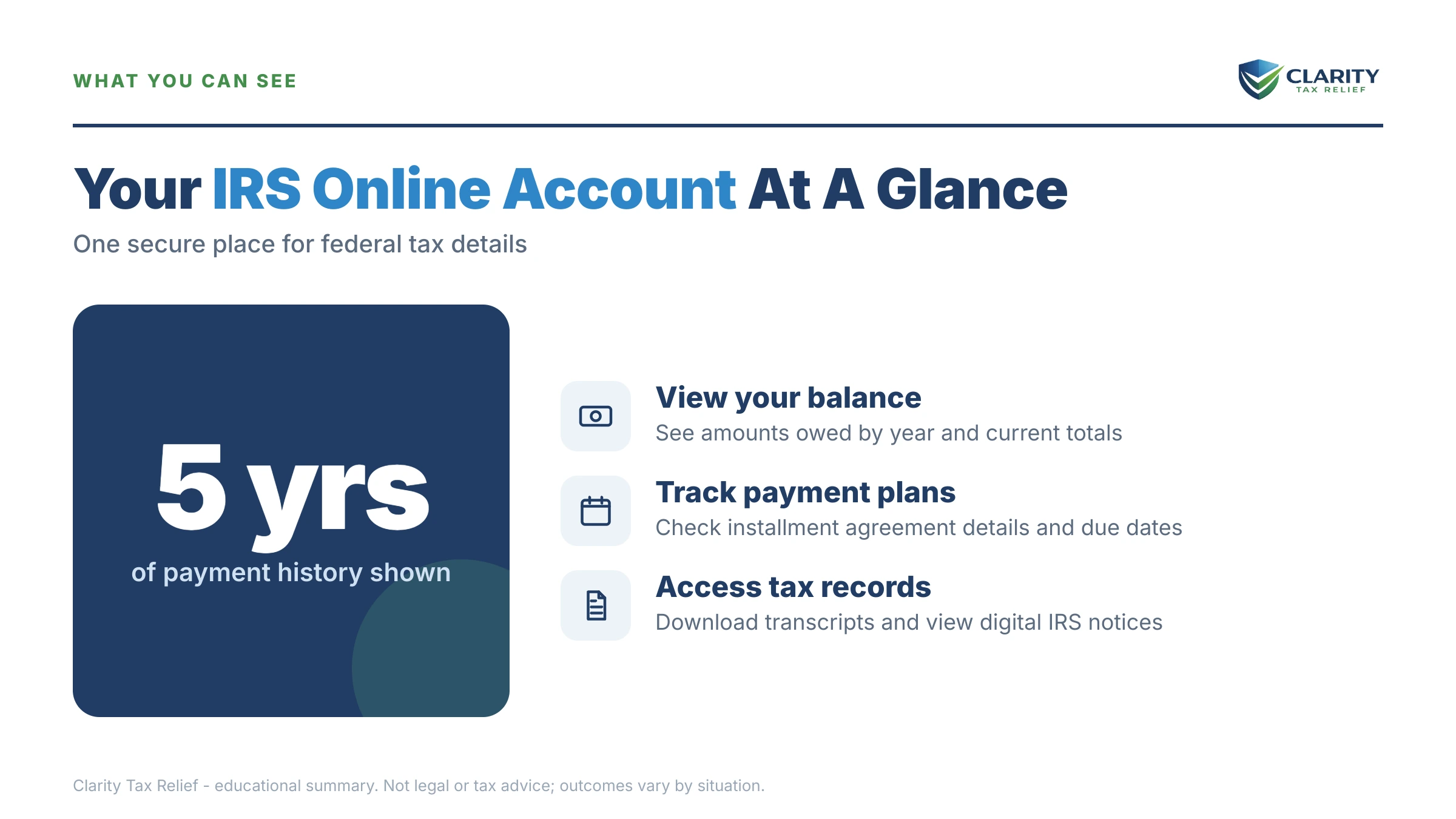
Once you're in, the account can replace most of what people used to sit on hold for: balances, transcripts, payments, plans, and copies of many notices. Here's the map:
| Feature | What you get | Watch for |
|---|---|---|
| Balance by tax year | Tax, penalties, and interest computed to the date shown | Recent payments can take time to post |
| Transcripts | Account, return, and wage & income transcripts — see getting your transcripts online | Codes need decoding — our guide on how to read an IRS account transcript translates them |
| Digital notices | Copies of many IRS letters, viewable anytime | Not every notice appears — keep your mailing address current |
| Payments | Pay from your bank account with no fee; full payment history | Confirm the payment applies to the right tax year |
| Payment plans | Apply for or revise a plan online | Long-term plans finish online only at $50,000 or less |
| IP PIN | Opt in to identity-theft protection; retrieve your current PIN | Once enrolled, returns without the PIN get rejected |
If you owe, the payment-plan tools are the reason to set the account up today. Which plan you can complete online depends on how much you owe:
| Option | Eligibility threshold | Terms |
|---|---|---|
| Pay in full from your bank | Anyone | $0 fee; stops future failure-to-pay penalty on that balance |
| Short-term payment plan | Most individual balances | Up to 180 days, $0 setup fee; interest and penalties still accrue |
| Guaranteed installment agreement | $10,000 or less in tax | Approval is required by law when the conditions are met |
| Streamlined installment agreement | $25,000 or less ($50,000 with direct debit) | No detailed financial disclosure |
| Long-term plan, fully online | $50,000 or less combined | Up to 72 months — walkthrough: how to set up an IRS payment plan online |
| Over $50,000 | No online completion | Financials (Form 433-F) by phone or mail — see IRS payment plan over $50,000 |
Deciding between paying in full, a plan, or something else entirely? Compare the best way to pay the IRS for your situation before you commit inside the account.
Say you owe $76,400: a worked example
This is hypothetical, but it shows why the account changes your decisions. Say you're a W-2 employee, single, and two years of under-withheld bonus income left you with $76,400 across 2023 and 2024. You set up your account and the balance page confirms it. Three facts now matter:
First, the meter. The failure-to-pay penalty at 0.5% per month is about $382 a month on $76,400 — before daily-compounding interest on top. You can estimate your own accrual with our penalty & interest calculator.
Second, your passport. $76,400 is above the $66,000 seriously-delinquent threshold for 2026. If the debt is certified, the State Department can deny a passport application or renewal. Getting into a payment arrangement is generally how certification is avoided or reversed — details in our guide to passport revocation for tax debt.
Third, the $50,000 online line. At $76,400 you can't finish a long-term plan online. But the account shows you the exact gap: pay the balance down by $26,401 — savings, a 401(k) loan you've priced out, whatever genuinely makes sense — and at $49,999 a fully online 72-month plan works out to roughly $695 a month before ongoing accruals. (One consolation: while an approved installment agreement is in effect, the failure-to-pay rate is cut in half.) Can't pay it down? You still get a plan over $50,000 — you just submit financials by phone or mail instead of clicking through.
Without the account, you'd be guessing at all three numbers. With it, you're choosing between two priced options.
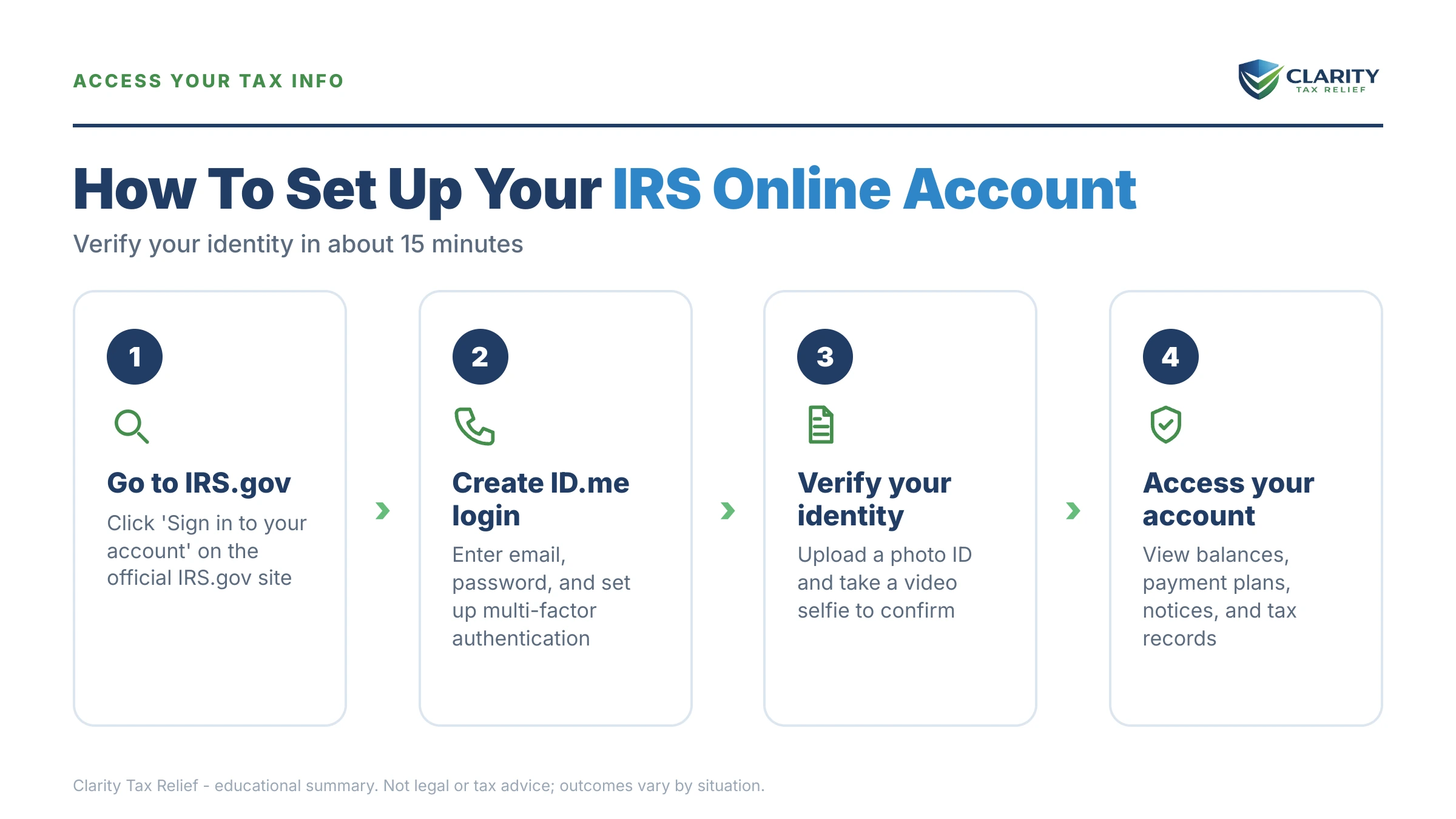
IRS online account setup, step by step
Setup runs in one sitting for most people — typically about 15 minutes if the automated ID check passes. The walkthrough image on this page shows the flow end to end, so match your screen against it as you go:
- Go to IRS.gov and choose 'Sign in to your online account.' Use the official IRS.gov site only — the account page is linked directly from the IRS homepage. Select the individual account option, then choose to create a new account with ID.me.
- Create your ID.me login. Enter your email address, set a strong password, and confirm the account through the link ID.me emails you. Then set up multi-factor authentication — a code sent to your phone or an authenticator app — which you'll use every time you sign in.
- Verify your identity. Upload photos of your government-issued ID (driver's license, state ID, or passport), take a video selfie, and enter your Social Security number. If the automated check fails, choose the live video chat option and a trained agent will verify your documents instead.
- Authorize ID.me to share your verified identity with the IRS. ID.me shows you exactly what it will pass to the IRS — your verified identity, nothing more — and asks for your consent. Approve it, and you'll land inside your IRS online account.
- Review your balance, transcripts, and notices for every year listed. Open the balance section first and write down the total and the tax years behind it. Then pull your account transcripts to see how each year got there — payments, penalties, and any holds.
- Set up your payment or payment plan before you log out. If you can pay in full, pay straight from your bank account with no fee. If you can't, apply for a short-term plan (up to 180 days) or a long-term installment agreement while you're in the account — a plan you set up today stops the balance-due notice sequence from escalating.
When ID.me won't verify you
Most verification failures trace to one of four fixable causes: an ID that doesn't match your current legal name, an expired document, bad photo lighting, or a selfie taken through a cracked or dirty camera. Retry self-service once with those fixed; if it fails again, switch to the live video chat path, where a human agent reviews your documents directly.
If you're stuck in a loop — codes not arriving, the selfie rejecting endlessly, a locked account — our dedicated guide to ID.me and idverify.irs.gov problems covers every known workaround. And a verification failure never blocks you from paying or getting transcripts: you can request transcripts by mail and make payments without an account while you sort it out.
When you can handle this yourself — and when to get help
Setting up the account is always a do-it-yourself job — it's free, and no one should ever charge you to create it. If your balance is small enough to pay within 180 days, or it's $50,000 or less and a straightforward online installment agreement fits your budget, you can likely finish the whole thing solo. Our hub on how to settle tax debt yourself walks through that full DIY playbook.
Experienced help changes outcomes in the harder cases: a balance over $50,000 where the IRS reviews your finances line by line, multiple unfiled years the account can't fully show you, a levy already in motion, or a balance you believe is wrong. In those situations, what you disclose — and in what order you fix things — directly changes what you end up paying, and a review before you commit is worth far more than one after.
Terms on your screen, decoded
- ID.me — the private identity-verification company the IRS uses to confirm who you are before showing your tax data; it's the login gate, not a government agency.
- Multi-factor authentication (MFA) — a second security step (a texted code or an authenticator app) required at every sign-in so a stolen password alone can't open your account.
- Account transcript — the IRS's line-by-line ledger for one tax year: assessments, payments, penalties, and holds, each with a transaction code.
- Accrued balance — your balance with penalties and interest computed to the date on the screen, which is why it's usually higher than the last letter you received.
- IP PIN — a six-digit Identity Protection PIN that blocks anyone else from filing under your SSN; you can enroll from inside the account — full details in our IP PIN guide.
IRS online account questions, answered
Is the IRS online account free to set up?
Yes — creating an IRS online account and the ID.me identity verification behind it are both completely free. You will never pay the IRS or ID.me to sign up, and any website charging a fee to create your IRS account is a scam. The only money that ever changes hands is tax you choose to pay through the account, which goes to the United States Treasury.
Why does the IRS make me use ID.me?
ID.me is the credential service provider the IRS uses to confirm you are who you say you are before showing your tax data. The IRS does not run its own login system for individual accounts; ID.me handles the photo-ID and selfie check, then passes only your verified identity to the IRS. One ID.me login also works at other federal agencies that use the same service.
What if ID.me can't verify my identity?
Start with the live video chat option — a human agent reviews your documents when the automated selfie check fails. The most common failure causes are an ID that doesn't match your current legal name, poor photo lighting, and expired documents. If video chat fails too, you can still request transcripts by mail and make payments without an account, so a verification failure never means you're locked out of paying.
Does my IRS online account show every year I owe?
It shows a balance for each tax year the IRS has assessed against your Social Security number, broken down by tax, penalties, and interest. A very recently filed return may not appear until processing finishes, and business balances tied to an EIN live in a separate business account. If a year you expected is missing, pull your account transcript for that year to see where it stands.
Can I set up a payment plan inside my IRS online account?
Yes. A short-term plan gives you up to 180 days to pay in full with a $0 setup fee, and a long-term installment agreement of up to 72 months can be completed entirely online if your combined balance is $50,000 or less. Above $50,000 you can still get a plan, but you'll need to submit financial information by phone or mail instead of finishing online.
Is the balance in my IRS online account up to date?
The balance page computes penalties and interest to the date shown on the screen, so it is fresher than any mailed notice. The main lag is payments: a mailed check or a very recent electronic payment can take time to post, so a payment you just made may not be reflected yet. When the account and a letter disagree, the account is usually the more current number.
Do I need an IP PIN before I set up my online account?
No — an Identity Protection PIN is not required to create the account. It works the other way around: once your account is set up, you can opt into the IP PIN program from inside it, which adds a six-digit code that stops anyone else from filing a return under your Social Security number. If you already have an IP PIN, you can retrieve the current year's number there too.
Your next 24 hours
- Pull out your driver's license or passport and have your Social Security number ready — that plus a phone camera is everything ID.me needs to verify you.
- Create the account and write down two things: your total balance and the tax years behind it. Start at the official page — IRS online account for individuals — and pay or set up a plan directly at IRS.gov/payments if the numbers are manageable.
- If the balance is more than you can pay within 180 days, get a free case review before another month of penalty and interest posts — the form at claritytaxrelief.com/#consult takes two minutes, or call (888) 825-7779.
If IRS systems themselves are causing you a genuine hardship — a payment lost in processing, an error nobody will fix — the independent Taxpayer Advocate Service exists for exactly that.
This guide is general information, not tax or legal advice for your specific situation. Eligibility for IRS programs depends on individual facts and circumstances; no outcome is guaranteed.